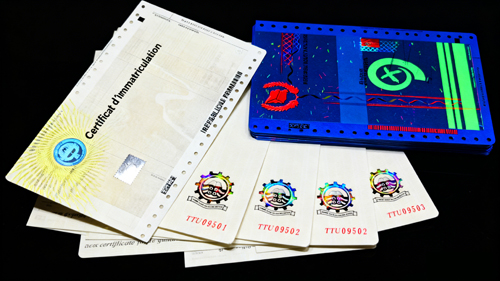
Fake certificates are a serious problem. They damage your reputation and can lead to major fraud. Understanding security features1 is the first step to protecting your documents and your organization's integrity.
The most common anti-counterfeiting features2 for certificates include Optically Variable Ink (OVI)3, hot foil stamping4, conductive ink5, UV fluorescent printing6, and anti-copy patterns7. Each feature adds a unique layer of security, making documents extremely difficult to forge and easy to authenticate for trained personnel.
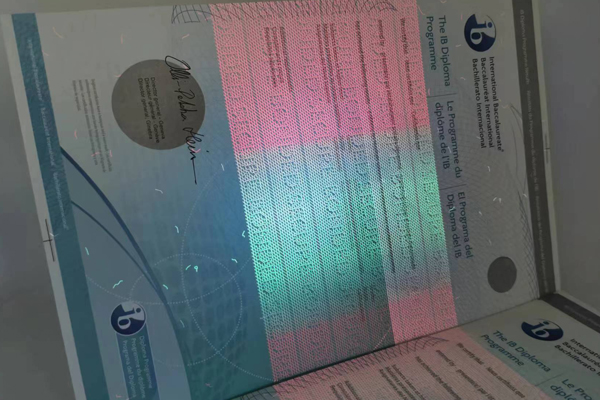
I have spent over 15 years in the security printing industry. I've seen firsthand how clever counterfeiters can be. But I've also seen how powerful a well-designed security system is. A single feature is good, but a combination of them creates a fortress. It's not just about stopping fakes; it's about building trust in the documents you issue. Let's explore some of the most effective features we use to protect our clients, from government agencies to universities.
How Does Optically Variable Ink (OVI)3 Secure Certificates?
Standard printed colors are easy to replicate with a scanner. This means a skilled forger can create a convincing fake. OVI provides a solution that standard printers cannot copy.
Optically Variable Ink (OVI)3 secures documents with special pigments that change color when tilted. This dynamic effect is nearly impossible to reproduce with scanners or printers, providing a simple yet highly effective way to verify a certificate's authenticity at a glance.
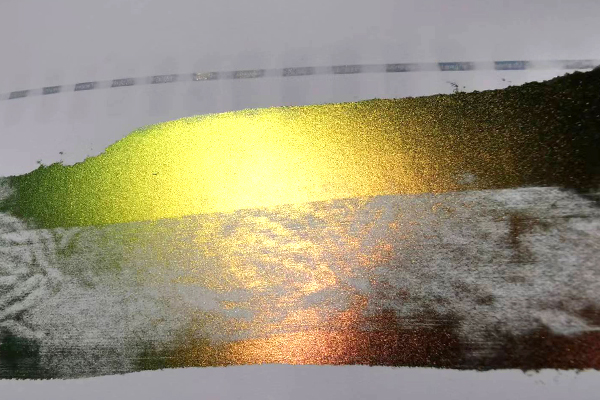
I always find OVI to be one of the most impressive "first-glance" security features1. When we present a sample to a client, the immediate color shift is what gets their attention. It's a simple, intuitive test that anyone can perform without special equipment. The magic is in the ink's composition. It contains tiny, multi-layered metallic flakes8. These flakes reflect different wavelengths of light depending on the angle you are viewing from. This is why you might see a logo shift from a deep green to a vibrant purple just by tilting the paper. This isn't a trick of light; it's advanced material science printed directly onto the document. This technology makes it a nightmare for counterfeiters, who rely on standard CMYK printing processes that can only produce static colors.
Key Aspects of OVI
| Feature | Description | Security Level |
|---|---|---|
| Color Shift | The ink displays two or more distinct colors based on the viewing angle. | High |
| Replication Difficulty | Requires specialized, expensive pigments and printing processes not available to the public. | Very High |
| Verification Method | Simple tilting of the document. No special tools are needed for a basic check. | Easy |
Why is Hot Stamping a Classic Security Feature for Documents?
A plain printed document can look unofficial and is easy to forge. It lacks a mark of true authenticity. Hot stamping adds a premium, hard-to-copy element that instantly elevates security.
Hot stamping, or foil stamping, applies a metallic or holographic foil9 to paper using heat and pressure. This creates a visually striking, durable, and tactile feature that is very difficult to replicate with standard inkjet or laser printers, confirming the document's authenticity.
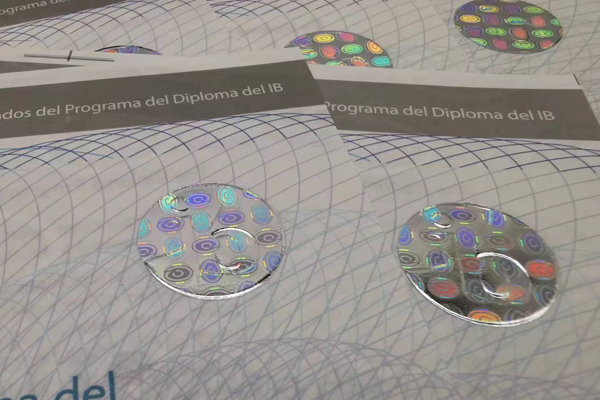
When I work with universities on their diplomas, hot stamping is almost always part of the conversation. It's a traditional feature that carries a sense of prestige and authority. The process itself is what makes it secure. We use a custom-made metal die, which is heated and then pressed onto the paper with a thin layer of foil in between. The heat and pressure bond the foil permanently to the paper fibers. You can feel the slightly debossed texture with your fingertip. Forgers can't replicate this effect with a printer. They might try to use metallic ink, but it will lack the unique shine, sharpness, and texture of a true foil stamp. We can also use holographic foil9ls](https://genuine-printing.com/blog/hologram-overlay/)%%%FOOTNOTE_REF_10%%%, which add another layer of security with their complex, light-refracting patterns. It's a feature that protects by being both beautiful and technically complex.
Comparing Foil Types
| Foil Type | Visual Characteristic | Common Use Case |
|---|---|---|
| Metallic Foil | Bright, reflective, solid color (e.g., gold, silver). | University seals, official crests, borders. |
| Holographic Foil | Displays 2D or 3D images, patterns, or rainbows of color that shift with light. | ID cards, high-security certificates, tax stamps. |
| Pigment Foil | Opaque, non-metallic color with a matte or gloss finish. | Less common for security, used more for design. |
What Makes Conductive Ink a Smart Choice for Modern Security?
Visual security checks are effective, but they can be fooled. Human error can lead to a fake document being accepted. Conductive ink allows for machine verification11, removing the guesswork.
Conductive ink contains materials like silver or carbon that carry an electrical current. This allows a document's authenticity to be verified with a special electronic reader, adding a covert layer of security that is impossible to detect or replicate without advanced technology.
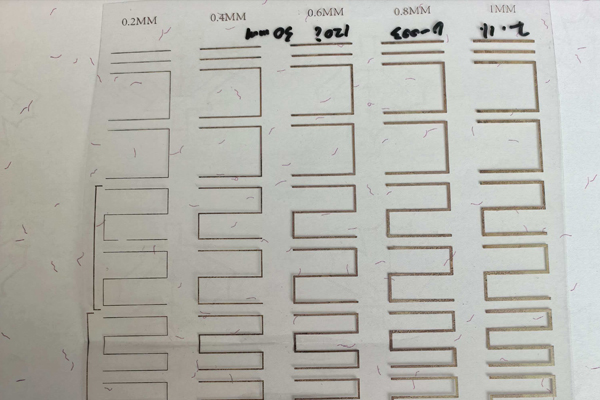
We had a government client who needed to process thousands of permits quickly and accurately. Visual inspection was too slow and prone to errors. We proposed a solution using conductive ink5. We printed a small, invisible circuit onto each permit. Their staff was then equipped with simple handheld readers. They just had to touch the reader to the spot on the permit. A green light meant it was genuine; a red light meant it was fake or invalid. This made the process fast and nearly foolproof. The ink itself is applied using standard printing methods like screen printing, but its formula is highly specialized. The pattern of the printed circuit can also be customized, creating a unique electronic signature for each type of document. This is a great example of how we blend traditional printing with modern technology to create robust security solutions.
How Conductive Ink Works
- Application: The ink, filled with conductive particles, is printed in a specific pattern or circuit on the document.
- Circuit Creation: This printed pattern forms a simple electronic circuit with a defined electrical resistance.
- Verification: A custom reader sends a tiny electrical current through the ink.
- Authentication: The reader measures the response. If it matches the pre-defined value for a genuine document, it is authenticated. This check takes less than a second.
How Does UV Invisible Printing Add a Secret Layer of Protection?
Overt security features1 are great, but they are also the first things counterfeiters try to copy. Sometimes, the best defense is hidden. UV printing hides critical security marks in plain sight.
UV invisible printing uses special fluorescent inks that are completely invisible under normal lighting. These inks only become visible, often in bright colors, when exposed to an ultraviolet (UV) light source. This adds a covert security feature that only authorized personnel can check.
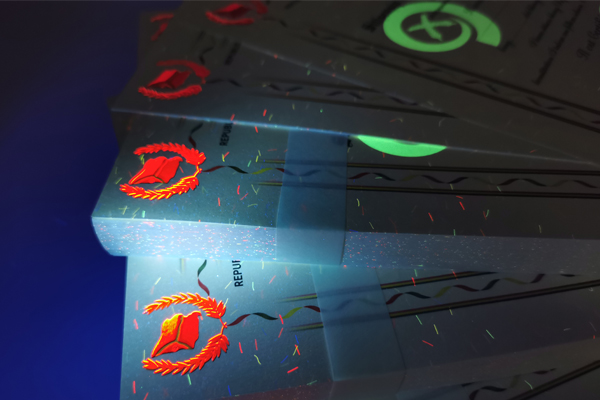
I remember working on a project for a government agency issuing vehicle permits. They were concerned about forgeries being used at checkpoints. We added a simple feature: the agency's logo printed in the center with UV invisible ink12. Under daylight, the permit looked normal. But at night, the checkpoint officers could shine a small UV flashlight on it, and the logo would instantly glow a brilliant blue. This allowed for quick, on-the-spot verification without needing complex equipment. We can print intricate patterns, text, or even serial numbers with this ink. We can also use inks that fluoresce in different colors (e.g., red, green, yellow) under the same UV light, or even inks that require specific UV wavelengths (shortwave vs. longwave) to appear, adding even more complexity for a potential forger to overcome. It's an affordable yet highly effective security layer.
UV Ink Security Levels
| Level | Description | Verification Tool |
|---|---|---|
| Level 1: Standard UV | Ink glows one color (e.g., blue or yellow) under a standard longwave UV light. | Basic UV flashlight. |
| Level 2: Multi-Color UV | Different parts of the design glow in different colors under the same UV light. | Basic UV flashlight. |
| Level 3: Dual-Wavelength UV | Ink appears as one color under longwave UV and a different color under shortwave UV. | Dual-wavelength UV lamp. |
Photocopiers and high-resolution scanners are a forger's best tools. A simple scan can often create a fake that looks good enough to pass a casual inspection. Anti-copy technology fights back directly.
Yes, anti-copy printing is very effective. It uses hidden patterns, often called a void pantograph13. When someone tries to photocopy or scan the document, these embedded patterns become visible, revealing a warning word like "VOID" or "COPY" on the unauthorized duplicate.
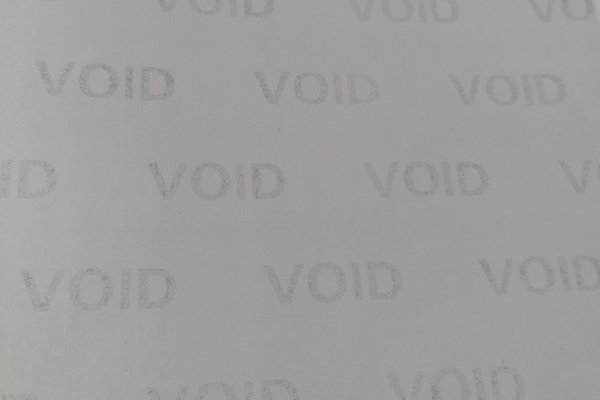
The first time I saw this feature in action, I was amazed. A perfectly clean-looking certificate was placed on a copier, and the copy came out with the word "VOID" plastered all over it in a repeating pattern. The technology is clever. We print a background screen made of extremely fine lines or dots. The original document looks clean because the human eye blends the pattern. However, the scanner or copier can't resolve the fine detail perfectly. This digital distortion causes the hidden word to appear in the copied image. While a very high-end scanner might be able to defeat a simple anti-copy pattern, we can combine it with other features, like microtext14, to make it even stronger. It acts as a great deterrent because it instantly invalidates any unauthorized copy, making it obvious that the document is not an original.
Comparing Covert Features
| Feature | How It Works | Primary Purpose |
|---|---|---|
| Anti-Copy Pattern | A hidden pattern (pantograph) becomes visible upon scanning or copying. | Deters and invalidates photocopies. |
| Watermark | A faint image embedded within the paper itself during its production. | Proves the paper stock is authentic. |
| Microtext | Extremely small text that looks like a solid line to the naked eye. | Difficult to read or reproduce with standard copiers. |
Conclusion
Combining multiple security features1 like OVI, hot stamping, and UV ink creates a layered defense. This makes certificates not just difficult to forge but also easy for you to authenticate.
Learn about the best security features to protect your documents from forgery. ↩
Explore the most effective anti-counterfeiting features to protect your certificates. ↩
Discover how OVI can provide a simple yet effective way to verify a certificate's authenticity. ↩
Explore how hot foil stamping adds a premium, hard-to-copy element to documents. ↩
Find out how conductive ink allows for machine verification, adding a covert layer of security. ↩
Learn how UV fluorescent printing adds a hidden layer of protection to your documents. ↩
Understand how anti-copy patterns deter and invalidate unauthorized copies of documents. ↩
Understand how these flakes create the dynamic color-shifting effect in OVI. ↩
See how holographic foil adds a visually striking and secure element to documents. ↩
Discover how holographic foils add a complex, light-refracting pattern to secure documents. ↩
Learn how machine verification reduces human error in authenticating documents. ↩
Explore how UV invisible ink provides a covert security feature visible only under UV light. ↩
Find out how a void pantograph reveals hidden patterns when a document is copied. ↩
Learn how microtext adds a layer of security by being difficult to reproduce. ↩