Worried about your important documents being illegally copied? This unauthorized duplication can lead to massive fraud and loss. Our advanced security paper1 makes exact replication impossible.
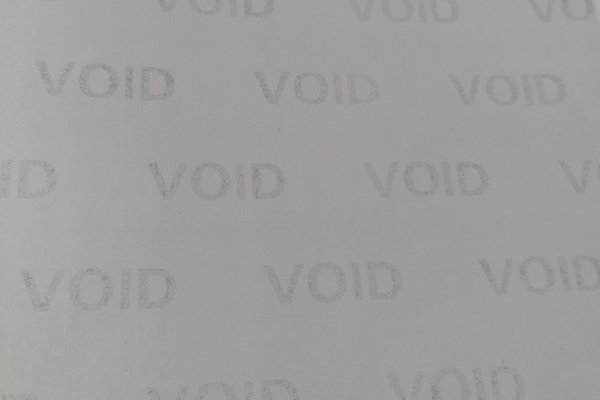
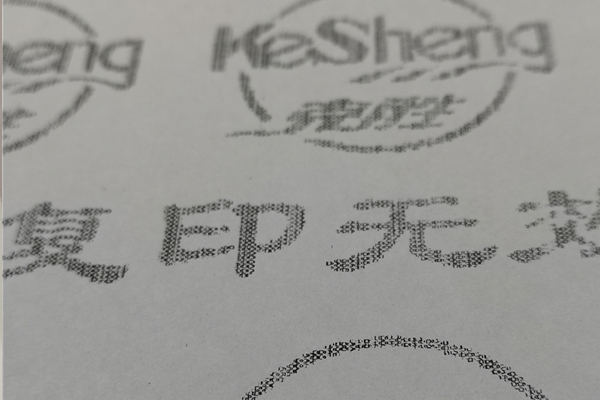
Security anti-copy paper integrates hidden features like "VOID" patterns, microtext, and chemical coatings. When someone tries to photocopy or scan the document, these features become visible, immediately revealing the copy and protecting the original's integrity. This makes forgery attempts obvious and preventable.
I've seen firsthand how devastating document fraud2 can be for organizations. It undermines trust and can lead to significant financial and reputational damage. But understanding how these security features work is the first step to protecting your assets. Let's explore the core technologies that make this protection possible and find the right fit for your needs.
What are the different types of anti-copy technologies3 available?
Choosing the right security paper1 can feel overwhelming. A wrong choice might leave you vulnerable to fraud. We can help you understand the key differences to make an informed decision.
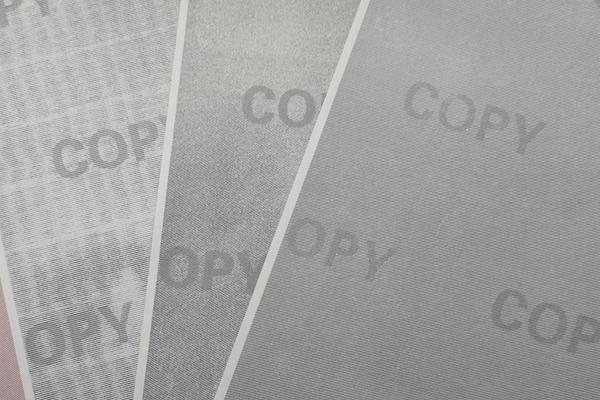
The main anti-copy technologies3 include chemical coatings4 that react to copiers, hidden background text5 (like "VOID" or "COPY"), UV-invisible inks6, and special paper with embedded security fibers7. Each offers a different level of protection against various forgery methods8.
When we design a secure document, we think in layers. Each layer adds a barrier against fraud. Some features are obvious, while others are hidden. The key is to combine them effectively. Let's break down the most common technologies we use.
Overt vs. Covert Features
We categorize security features into two main groups. Overt features are visible to the naked eye, like a hologram. Covert features are hidden and require a special tool to see, like a UV light or a magnifying glass. Anti-copy technology often falls somewhere in between; it's hidden until a copy is attempted.
Here is a comparison of the core technologies:
| Technology | How It Works | Pros | Cons |
|---|---|---|---|
| Hidden "VOID" Text | A background pattern designed to become visible only when scanned or photocopied. | Effective against casual copying, low cost. | Can be digitally removed by skilled forgers. |
| Chemical Coating | A special coating on the paper that reacts to the light/heat of a copier, revealing a warning message. | High security against photocopying. | May not react to all digital scanning methods. |
| UV Invisible Ink | Ink that is invisible in normal light but glows under an ultraviolet (UV) light source. | Excellent for quick, covert verification. | Requires a UV light for verification. |
| Security Fibers | Tiny colored or fluorescent fibers mixed into the paper pulp during production. | Extremely hard to replicate; part of the paper itself. | Adds to the cost of the paper base. |
Combining these gives the best result. For example, a certificate might have a "VOID" background, our company logo printed in UV ink, and visible security fibers7 within the paper itself. This layered approach makes a forger's job much more difficult.
How effective is anti-copy paper against modern duplication methods?
Even with security paper1, are you sure you're protected against high-resolution scanners and smartphones? These new threats require a new level of defense. Our solutions are tested against them.
Modern anti-copy paper is highly effective. Against photocopiers, it reveals warning words like "VOID". Against high-resolution scanners, complex patterns and microtext become blurred. For smartphone photos, features like holographic elements9 and OVI ink change appearance, proving authenticity.
A forger’s toolkit10 has evolved, and so have our defenses. It's no longer just about defeating the office photocopier. We now focus on creating documents that resist digital capture and manipulation. From my 15 years of experience, I know that no single feature is foolproof. That is why we stress a multi-layered defense11 that addresses different threats.
Performance Breakdown by Threat
Let's see how different security features hold up against common forgery methods8. A feature that stops a photocopier might not stop a high-end scanner, and vice versa.
| Threat | Hidden "VOID" Text | Microtext | UV Ink | Holographic Patch |
|---|---|---|---|---|
| Photocopying | High: The warning text becomes clearly visible. | Low: The text becomes an illegible line. | N/A: The ink is not visible and won't be copied. | Low: The hologram appears as a flat, 2D image. |
| High-Res Scanning | High: The pattern is triggered and becomes visible. | Medium: The text is often distorted or unreadable. | N/A: The scanner cannot see the invisible ink. | Medium: It's captured as a flat image, losing all depth. |
| Smartphone Photo | Low: The pattern may not be triggered by a photo. | Low: The text is too small to be captured clearly. | High: The feature is covert and remains secure. | High: The color and image shift, proving authenticity. |
As you can see, a layered strategy is critical. A "VOID" pattern stops basic copying. Microtext adds another barrier for scanners. A holographic patch provides quick visual authentication that photos can't capture. And UV ink provides a covert check that only authorized personnel can perform. This is how we build truly secure documents.
How do you choose the right security level for your documents?
Are you overpaying for security you don't need, or worse, under-protecting critical assets? Choosing the wrong level is a common and costly mistake. Let's find your perfect fit.
We use a simple 4-level framework. Level 1 is for basic internal documents. Level 2 is for certificates. Level 3 is for government permits. Level 4 is for high-stakes documents like passports, combining multiple overt and covert features.
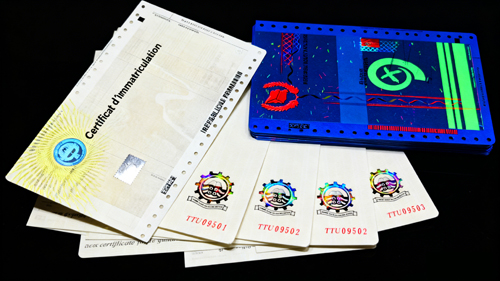
Over the years, we've helped hundreds of clients, from universities to government agencies like the Bolivian government. This experience has taught us how to match the right security features to the document's specific risk profile. You don't need banknote-level security for an internal report, but a university diploma demands more than just a simple anti-copy background. Our framework makes this process straightforward.
Matching Security Level to Application
This framework helps you balance security and cost effectively.
| Level | Recommended Use | Key Features |
|---|---|---|
| Level 1: Basic | Internal Reports, Memos, Invoices | Anti-copy "VOID" pattern, unique serial numbering. |
| Level 2: Standard | University Certificates, Diplomas, Transcripts | Level 1 features + Microtext + UV invisible printing or fibers. |
| Level 3: High | Tax Stamps, Government Permits, Contracts | Level 2 features + Custom Watermark + Chemical Reaction Paper. |
| Level 4: Maximum | ID Cards, Passports, Banknotes | Level 3 features + Holographic Patch/Overlay + OVI Ink + Security Thread. |
For example, a university issuing thousands of diplomas (Level 2) needs features that are easy for employers to verify but difficult to copy. Here, UV ink and microtext are perfect. For government tax stamps (Level 3), we need to prevent not just copying but also chemical alteration to change the value. That's where chemically reactive paper becomes essential. For national ID cards (Level 4), we combine everything to create a document that is nearly impossible to forge, ensuring citizen identity and national security.
What common mistakes should you avoid when ordering security paper1?
You've chosen your security features, but the project still fails. Printer incompatibility or wrong paper weight can ruin everything. We've seen it happen, and we can help you avoid it.
The most common mistakes are choosing the wrong paper weight (grammage) for your printer, overlooking printer compatibility (laser vs. inkjet), not requesting a production sample for testing, and failing to secure the supply chain.
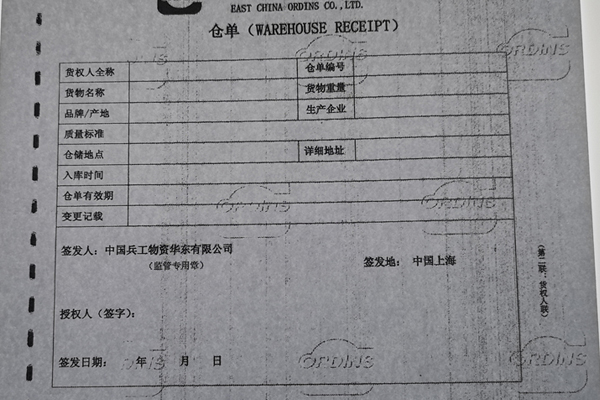
A secure document is more than just the sum of its features. The physical paper and the printing process are just as important. A small oversight can compromise the entire project. We provide a one-stop customization service, from design to delivery, precisely to prevent these kinds of mistakes. We guide our clients through the entire process.
A Practical Checklist for Buyers
Here are some practical points to consider before placing an order.
- Paper Grammage (Weight): Paper is measured in grams per square meter (gsm). Standard office paper is about 80 gsm. For certificates, we often recommend 120 gsm or higher because it feels more official and is more durable. However, you must check if your office printer can handle thicker paper stock.
- Printer Compatibility: This is crucial. Paper designed for laser printers is built to withstand heat. If you use it in an inkjet printer, the ink may not absorb properly and could smudge. Conversely, using inkjet paper in a laser printer can cause the coating to melt and damage the machine. We always ask about your printing plans to supply the correct paper.
- Customization Possibilities: Don't settle for off-the-shelf solutions for important documents. We can create a custom watermark12 with your organization's logo or embed a unique holographic design. This makes your document truly one-of-a-kind and instantly recognizable.
- Requesting Samples: Never commit to a large order without testing a sample first. We encourage clients to request samples to test in their own printers and to see the security features for themselves.
- Secure Supply Chain: The security paper itself is a valuable asset. You must ensure your supplier has a strict confidentiality and traceability system. Our process is designed to protect your sensitive documents from the moment they are designed until they are safely delivered.
Conclusion
Layering features like microtext and anti-copy patterns is the best defense. We can help you design a custom solution to protect your most valuable documents from fraud.
Explore the fundamentals of security paper to understand its importance in document protection. ↩
Explore the serious consequences of document fraud and the need for effective security. ↩
Learn about various anti-copy technologies to choose the best protection for your documents. ↩
Discover how chemical coatings can significantly improve the security of your important documents. ↩
Understand the role of hidden background text in preventing unauthorized duplication. ↩
Find out how UV-invisible inks provide covert security features for documents. ↩
Learn about security fibers and their effectiveness in preventing forgery. ↩
Learn about various forgery methods and how to protect against them. ↩
Learn how holographic elements can provide quick visual authentication for documents. ↩
Discover the tools used by forgers and how to effectively counteract them. ↩
Understand the concept of multi-layered defense and its effectiveness against forgery. ↩
Explore how custom watermarks can make your documents unique and secure. ↩